MailSage
Stack
Type
Duration
Year
TL;DR
MailSage is a web application that connects to Gmail and uses AI to generate concise summaries, identify potential action items and surface key links from individual email messages.
I originally conceived it to assist me in my previous role at a software company, where I could expect to receive in excess of 10 email threads per day. These lengthy conversations typically involved at least two other people and concerned matters such as software bugs and product features. I wanted to explore whether AI could reduce the time spent reading through messages and reconstructing their context.
I built and shipped the initial version independently in approximately 11 weeks.
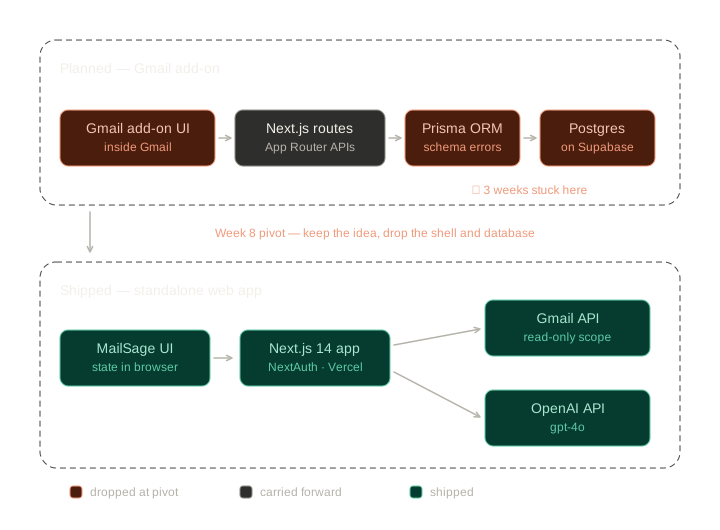
MailSage began as a more complex Gmail add-on, supported by a database-backed architecture. However, when a persistent infrastructure issue with PostgreSQL threatened my intended delivery deadline, I reassessed the scope of the project. With only three weeks remaining, I refocused on the product's central value proposition and rebuilt it as a much leaner, standalone Next.js application. I also used Vite for rapid prototyping during development.
Product | AI-assisted Gmail summarisation application |
My role | Product definition, technical planning, interface design, development, QA testing/debugging and deployment |
Project period | Approximately 11 weeks |
Core tech | Next.js, React, JavaScript, Gmail API, Google OAuth, OpenAI API and Vercel |
Prototyping tools | Vite and HTML |
Initial technologies explored | PostgreSQL, Prisma, Supabase and Resend |
Development support | Developer documentation, ChatGPT, Gemini, Claude*, Cursor, Stack Overflow and developer communities |
Final outcome | A deployed application that retrieved Gmail content and generated summaries and action items |
* Used during a retrospective log analysis.
Post-launch update — October 2026
I revisited MailSage to improve its authentication and security, resolve issues with email management controls, and introduce persistent storage for pinned and hidden emails.
The updated application now retains these preferences across browser refreshes and sign-in sessions, without modifying the underlying Gmail account. I implemented, tested and released the changes through a dedicated Git branch, a GitHub pull request, and Vercel preview and production deployments.
The work is documented in Section 010 below.
Section 001: The motivation
Important decisions, questions and next steps can become buried inside lengthy email conversations. Returning to an older thread often means rereading several messages simply to reconstruct what happened. I wanted to explore whether AI could reduce that effort in my workflow, by producing a concise overview of the conversation and grasping its context in order to identify actionable items/steps.

Section 002: The original concept
My initial intention was to build the experience directly into Gmail itself, supported by a more complete backend architecture. Before implementation, I wrote detailed pseudocode, identified the functions it would need, and mapped reusable elements from an existing TypeScript project, to the new JavaScript-based frontend.
Original architecture

Section 003: The constraints
A persistent PostgreSQL and Prisma schema issue, prevented the database layer from functioning as intended. I initially approached the problem through code review, documentation research, community resources and AI-assisted troubleshooting. When the investigation began producing repeated or destructive suggestions, I introduced a written test log to track hypotheses and avoid repeating previous attempts.
Section 004: Pivoting
The Wall (Context)
To elaborate further on the constraints, by week 5 of the project, the backend looked to be taking shape — App Router routes, a Prisma schema, a Postgres database. But then the console errors started: Prisma was referencing tables within the database's schemas in a way I couldn't seem to get past. What looked like a day of debugging became three weeks (as I was working on this at the end of my workday). I worked through the official Supabase docs, Stack Overflow, and Reddit, plus Gemini and ChatGPT — the latter of which (at one stage) kept looping me toward 'fixes' that would have deleted a key component of the database. To stop circling, I began logging every test I ran, so that I wouldn't inadvertently repeat a step. By week 7 of the project however, I was now two weeks behind, and no closer to resolving the backend issues.
The Options
Keep digging — unbounded time risk against a fixed deadline.
Cut features, but keep the add-on architecture — a smaller product on the same broken foundation.
Or move the idea out of Gmail entirely — lose the add-on form factor, keep the core value, drop the layer causing the problem.
Continue debugging | Reduce scope and pivot |
|---|---|
Preserve the original architecture | Preserve the central user value |
Risk missing the deadline | Increase the likelihood of shipping |
Potentially solve the database problem | Remove a non-essential dependency |
Leave less time for UX and QA | Create time for an end-to-end prototype |
The Call
With only 3 weeks remaining, I took a risk and decided to pivot. The reframe that made it possible: the database wasn't the product — the summaries were. Removing the architectural constraints, preserved the core premise behind the project.
The Rebuild
Three weeks to deliver on a working build, ended up being sufficient time for me, only because of two decisions:
I prototyped in Vite for its fast feedback loop, but wrote standard .jsx throughout (so that ~90% of the code would port straight into Next.js for production).
And I reused my earlier OAuth and Gmail API work, rather than rebuilding from zero.
Eight prototype versions later, I migrated the codebase, QA-tested multiple OpenAI models to balance speed against summary quality, and deployed to Vercel on deadline.

The pivot removed architectural complexity without removing the product’s central proposition.
Planned vs Shipped Architecture
Section 005: Minimum viable workflow
Given the time constraints, I temporarily deprioritized visual design, and focused my efforts on proving the smallest complete technical path. The more challenging (and thus time consuming) aspects at this stage of the project were:
Setting up the OAuth credentials correctly in Google Cloud
Plugging these into NextAuth
Fetching email data via the Gmail API
This was the stage at which I decided to introduce additional tools (i.e. Cursor) into the debugging process. Primarily as an AI-assisted development environment, rather than as an autonomous builder. For example, it quickly became a useful aid in understanding errors and helping with refactoring smaller pieces of code.
Core Loop
High-level system flow:

Breakdown:

The intended API route would essentially:
Take the logged-in user's credentials
Call Gmail
Gmail then returns a simplified list of emails (subject line, snippet, date, thread ID), outputting them initially in the following JSON format:
And then eventually in the following example format:
I opted to display the fetched Gmail data in raw JSON initially, because my primary focus was on building out the backend infrastructure. And this was the quickest way to iterate on the app's core functionality.


MVP Version: MailDeck
The initial dev version of the product (which I called 'MailDeck' at the time) was able to successfully authenticate with Google, retrieve Gmail content, send that content to the OpenAI API, and subsequently return summaries and action items through two manual controls.


Section 006: LLM selection
Deciding which large language model would power the summary generation feature, was a process comprised of reading up on OpenAI's existing models and their respective spec sheets, pulling feedback online from other developers, and then running experiments to better understand each model's limitations.
Criteria
At a high-level, I screened each model against the following benchmarks:
Summary quality
Ability to identify relevant actions
Response speed
Consistency
Potential operating costs
Tested Models
gpt-3.5
gpt-4o
gpt-5-mini
gpt-5-nano
gpt-5.1
The reason I included a legacy model like gpt-3.5, was that it allowed me to set a baseline for testing. Being able to compare multiple models of varying levels, made the the experiment more comprehensive.
Considerations (Trade-offs)
While a faster model may occasionally produce less nuanced summaries, a more capable model could make the interaction feel unnecessarily slow. Speed was a crucial factor for me.
Decision
I opted for a model which provided an acceptable quality-to-latency balance, rather than defaulting to the most seemingly-capable, the fastest, or the most expensive option. The model I selected is gpt-4o.
From the tests I ran, it seemed to fare better than some of the newer models at grasping the necessary context. Particularly as it pertained to pulling action items.
Section 007: Vite → Next.js
Rather than immediately rebuilding the complete web application in Next.js, I used Vite as a lower-friction environment for interface development and debugging. And because both environments use React and standard JSX, most of the prototype's code could later be ported over without having to be rewritten.


Section 008: AI-assisted development
AI tools accelerated parts of the research and debugging process, but they were not reliable substitutes for documentation, controlled testing or architectural judgement.
At one stage, I recall ChatGPT suggesting a fix which would have removed an important database component. As a counteractive measure, I decided to compare outputs across various LLMs and tools, validating their suggestions against official developer documentation, and maintaining a written record/log of attempted fixes.
Section 009: Final Week
I completed and deployed a working version of MailSage that connected to Gmail, retrieved email content and used the OpenAI API to generate summaries and action items. I migrated the prototype into Next.js, stored the project in GitHub, configured the required Google Cloud settings and deployed the application through Vercel’s GitHub integration.
The final week also included:
UI clean-up
Further feature trimming (search functions)
Model QA
Google Cloud amendments
Multiple deployment tests
Last-minute API and UX fixes
Automatic Vercel updates following the final GitHub push

Project Timeline

Section 010: Post-launch improvements
Revisiting MailSage
In October 2026, I returned to MailSage to address several functional limitations, review parts of its security architecture, and improve the reliability of the application.
One issue concerned the email management controls. Users could pin important emails or hide unwanted messages using the archive and delete icons, but these actions were not persistent.
For example, hiding an email would initially remove it from MailSage's interface. However, after refreshing the browser or returning to the application, the same email could reappear. Pinned emails could also lose their pinned status.
The interface was responding to the user's actions, but the application wasn't reliably preserving those decisions.
The Problem: Temporary State vs Persistent State
The underlying issue was how the application managed its data.
MailSage used React state to track changes within the interface. While this worked during an active session, these temporary values could be lost when the application reloaded or fetched fresh email data from Gmail.
I needed to introduce a way of remembering which emails users had pinned or hidden.
Crucially, I wanted to accomplish this without changing anything in Gmail itself.
The Decision: localStorage vs PostgreSQL
I considered whether these preferences required a database, particularly given that PostgreSQL had formed part of MailSage's original architecture.
For this iteration, I decided against reintroducing that complexity.
Instead, I opted for localStorage, a browser feature that allows applications to retain small amounts of data between visits.
MailSage now keeps two sets of Gmail message identifiers:
pinnedIds— messages that the user has pinned.hiddenIds— messages the user has chosen to hide.
These identifiers are saved in the browser under a key associated with the signed-in Google account.
When the application loads, it retrieves the saved preferences and applies them to the email data returned by Gmail. This ensures that previously hidden messages remain hidden, and previously pinned messages retain their status.
I also adjusted the React logic to ensure that these preferences were reflected consistently in the email list and individual message view.
Both the archive and delete controls continue to act as MailSage-only hide actions. Neither operation archives, deletes or modifies emails in Gmail.
The principal trade-off is that localStorage is specific to the browser and its storage environment. Preferences are retained between sessions on the same browser, but they do not automatically synchronise between devices. Clearing browser storage can also remove them.
For MailSage's current scope, I considered this an acceptable compromise.

Figure 1 — Local email preference persistence. MailSage retrieves message data from Gmail and combines it with locally stored pinned and hidden message IDs. These preferences affect what appears in MailSage's interface without modifying the underlying Gmail account.
Authentication and Security Improvements
I also used this iteration to revisit parts of MailSage's authentication and email-rendering architecture.
The changes included:
Updating Next.js to version 16.4.1 and NextAuth to version 4.24.15.
Introducing JWT-based session handling, with Gmail access tokens retrieved server-side when processing API requests.
Adding DOMPurify to sanitise HTML email content before rendering it in the interface.
These changes were intended to improve how authentication credentials were handled and reduce risks associated with displaying externally supplied HTML content.
I also ran an npm dependency audit to identify known security vulnerabilities.
The production-dependency audit reported zero vulnerabilities. However, five high-severity issues remained within the development dependency chain associated with ESLint, which I documented for subsequent review.
Testing: Beyond a Successful Build
After implementing the changes, I tested the application locally and then within Vercel's preview environment.
I tested the pin functionality by selecting an email, refreshing the page, and checking whether the message remained pinned. I repeated the test after waiting approximately 10 minutes and refreshing again. The preference persisted.
I also tested unpinning, confirming that the email was removed from the Pinned tab and remained unpinned following another refresh.
For the hide controls, I tested both archive and delete actions. I refreshed the application, signed out, and signed back in to confirm that hidden messages did not reappear.
I then opened Gmail directly and verified that the same messages were still present in the original inbox.
This was an important test: the changes needed to persist within MailSage without affecting the underlying Gmail data.
I also inspected the browser's developer tools to confirm that the pinned and hidden message identifiers were being stored in localStorage.

Figure 2 — MailSage's Pinned tab. Two emails saved for quick access using MailSage's local pinning functionality. Pinned preferences persist across browser refreshes and sign-in sessions, without modifying the underlying messages in Gmail.

Figure 3 — Persistence validation. I tested pinned and hidden emails across browser refreshes and sign-in sessions, then inspected Chrome's developer tools to verify that their identifiers were saved in localStorage. I also checked Gmail directly to confirm that hidden messages remained in the original inbox.

Figure 4 — Verifying localStorage persistence. Arc browser Developer Tools showing MailSage's account-specific browser storage entry, including the pinnedIds and hiddenIds arrays. This confirms that pinned and hidden email identifiers were saved locally, rather than modifying the underlying Gmail messages.
Deploying the Changes
Rather than committing the changes directly to the production branch, I worked through a dedicated Git feature branch.
The development cycle involved reviewing the code changes, running a production build, checking the Git diff for formatting errors, and committing the updates.
I pushed the branch to GitHub and opened a pull request containing two commits.
Vercel automatically generated a preview deployment, which allowed me to test the changes before releasing them to production.
During this process, Google authentication initially failed with an OAuth redirect_uri_mismatch error. The preview environment used a different URL from the production application, which had not yet been registered as an authorised redirect URI in Google Cloud.
After identifying the exact callback URL from Google's error details, I registered it in Google Cloud and repeated the authentication test successfully.
Once the changes had passed the relevant checks and functional tests, I merged the pull request into main.
Vercel then deployed the updated production application, where I repeated the functional checks. Finally, I synchronised my local main branch with GitHub and removed the completed feature branch.
View the merged pull request on GitHub
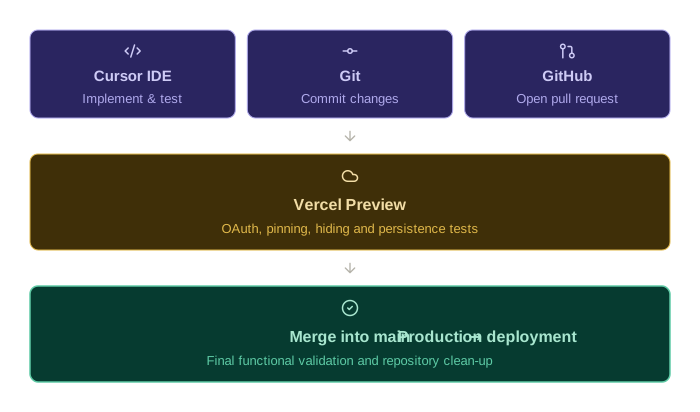
Figure 5 — The October 2026 release workflow. I implemented the changes locally, committed them to a dedicated Git branch, validated the application through Vercel's preview deployment, and merged the pull request into main after testing. The resulting production deployment was subsequently verified.
Outcome and Reflections
The changes resolved the observed persistence issue and improved the reliability of MailSage's email management controls, while preserving its read-only relationship with Gmail.
The work also reinforced an important distinction between implementing a feature and ensuring that it behaves consistently over time.
From an architectural standpoint, it demonstrated that persistent data does not always require a database. The appropriate solution depends on what needs to be stored, how the information will be accessed, and which product requirements justify additional complexity.
This was also my first opportunity to revisit MailSage as an existing, deployed application rather than a product racing towards its initial release deadline.
The original build taught me when to remove complexity to protect the delivery of a working product.
This iteration reinforced the value of introducing complexity deliberately, validating changes in realistic environments, and treating post-launch maintenance as part of the product development lifecycle.
____________________________________________________________________
Product Demo
Reflections
As highlighted in 'Section 004' above, with approximately three weeks remaining until my intended delivery date, I had to decide whether to continue investigating the database layer, or protect the project’s core outcome. I determined that the likely investigation cost, would exceed the remaining project window. This meant that I had to accept that the database was part of the implementation approach, but not the central user value. I therefore removed it from the critical path, and reframed the the app around one end-to-end workflow: retrieve email content → and generate useful summaries and action items.
The compressed schedule came with defect frequency risks. And I found myself trying to rush through certain tasks. Rather than this approach accelerating my progress; it actually led to syntax errors, increased the likelihood of bugs, and it made debugging more stressful for myself. Thus counteractive measures included narrowing the project scope/build, streamlining my workflow (ref. Section 005 above), and introducing additional QA.
Database Issue
I reviewed the relevant log data, as part of a retrospective into the initial stages of the project (i.e. pre-pivoting). Returning to the errors with a fresh perspective, I was able probe the console errors in ways I hadn't thought of doing, previously. I also decided to introduce Claude as part of this, given that it was a variable I had not included during the initial build. And through this process, I learnt that the persistent console errors were due to the port I was trying to use. My database URL ended in:
And that (6543) port meant I was attempting to connect to Supabase via a Connection/Transaction-mode Pooler.
A connection pooler functions like an efficient receptionist in a busy office. When an app needs a quick piece of data, the receptionist assigns an available worker to the task. The worker procures the data for you, and then the receptionist immediately sends the worker back into the 'pool' to assist another application with their query.
This dynamic is great for quick/short-lived application queries, such as fetching a product by its 'slug' for a page render on an e-commerce website, looking up a user's session upon logging in, inserting a comment on a website, changing a view counter etc. Connection poolers are therefore, best suited for single round trips that finish in milliseconds and leave nothing behind on the connection. But it is not suited for what I was attempting to do: a Prisma migration.
A Prisma/database migration is akin to a major home or office renovation. And for such tasks, Prisma needs a dedicated 'contractor' to stay on-site in order to carry out the heavy structural work, without any interruptions. This is the reason for the persistent console errors I was getting: the connection pooler was attempting the migration, but then returning to the 'pool' before the process was complete. It left the migration 'hanging'. But this is to be expected, given that connection poolers are hard-coded for quick tasks/queries.
However, Supabase's Session Pooler (on port 5432) is much better suited for such workflows.
Revisiting the Architectural Decision
The October 2026 improvements provided an opportunity to apply one of the lessons from the original build.
Having previously removed PostgreSQL from the application's critical path, I was now faced with a smaller persistence problem: how to retain users' email preferences between sessions.
Rather than defaulting to a database, I assessed what information actually needed to be stored, how frequently it would be accessed, and whether synchronisation between devices was a requirement.
In this case, the data consisted of small sets of message identifiers, and cross-device synchronisation was not essential for the current scope.
I therefore chose localStorage, avoiding the additional database infrastructure while achieving the intended behaviour.
This reinforced the importance of treating architecture as a response to product requirements, rather than introducing technologies simply because they are commonly associated with a particular type of application.
I also came away with a greater appreciation for post-launch validation. A successful build or an immediately responsive interface does not necessarily mean a feature is reliable. Testing what happens after a refresh, a new session or a production deployment can reveal limitations that would otherwise go unnoticed.
Further Takeaways
Product
The core user value should be distinguishable from the original technical implementation.
Removing features can improve the likelihood that the central experience is delivered.
A working vertical slice is more valuable than several partially-completed system layers.
Deadlines require active scope management rather than simply working faster.
A feature that responds correctly in the interface is not necessarily complete; its behaviour must also remain consistent across the relevant user journey.
Introducing persistence should be guided by product requirements, particularly whether cross-device access, shared data or long-term retention is necessary.
Post-launch improvements can expose requirements and limitations that were less obvious during the initial build.
Engineering
Authentication, API retrieval and AI processing should always be validated independently.
A prototype environment can reduce debugging complexity.
Shared framework foundations can make later migrations less costly (in both time and resources).
Troubleshooting should be logged systematically.
AI-generated fixes need independent verification.
React's in-memory state is useful for managing interface behaviour, but persistent preferences require an appropriate storage mechanism.
Browser
localStoragecan be sufficient for small, device-specific preferences, without introducing database infrastructure.Authentication changes should be tested across local, preview and production environments, particularly where OAuth redirect URLs differ.
Production dependency audits and development dependency audits can produce different results, and remaining vulnerabilities should be documented rather than ignored.
Successful compilation does not replace functional testing across refreshes, sign-in sessions and deployment environments.
Workflow
Detailed planning helped me begin, but excessive preparation also consumed scarce implementation time.
Compressed schedules increased syntax errors and made debugging more stressful.
Trying to complete architecture, interface, functionality and QA concurrently created unnecessary risk.
Future projects should establish a minimal end-to-end proof at a much earlier stage.
Dedicated Git branches and pull requests create a clearer record of changes and provide an opportunity to validate work before merging.
Preview deployments help distinguish locally working changes from behaviour in a deployed environment.
Closing a development cycle includes verifying production, synchronising the local repository and cleaning up completed branches.
Overall, the main takeaway is not that the original architecture was wrong. It was that I had committed to too much of it before proving the project’s smallest valuable workflow. It's a lesson that I will carry into all future projects: validate backend architecture first (such as authentication, retrieval systems, AI outputs etc) — and then introduce persistence or additional features, only after stress-testing stability.
Tech Stack
JavaScript
React — Component state management and email interface logic
Browser localStorage API — Persistent, account-specific pinned and hidden email preferences stored locally in the browser
DOMPurify — HTML email content sanitisation before rendering
Development & Release Workflow
VS Code, Cursor IDE, Kiro CLI, Git, GitHub (including pull requests), and Vercel (preview and production deployments).